
Menu
×
   ❮   
HTML CSS JAVASCRIPT SQL PYTHON JAVA PHP HOW TO W3.CSS C C++ C# BOOTSTRAP REACT MYSQL JQUERY EXCEL XML DJANGO NUMPY PANDAS NODEJS DSA TYPESCRIPT SWIFT ANGULAR ANGULARJS GIT POSTGRESQL MONGODB ASP AI R GO KOTLIN SWIFT SASS VUE GEN AI SCIPY AWS CYBERSECURITY DATA SCIENCE INTRO TO PROGRAMMING HTML & CSS BASH RUST

AWS Automatic Reasoning and Tool-use (ART)


Automatic Reasoning and Tool-use (ART)

Like the self-consistency and ToT prompt techniques, ART is a prompting technique that builds on the chain-of-thought process.

The ART technique, discussed in detail in Bhargavi Paranjape's "ART: Automatic multi-step reasoning and tool-use for large language models," is used specifically for multi-step reasoning tasks.
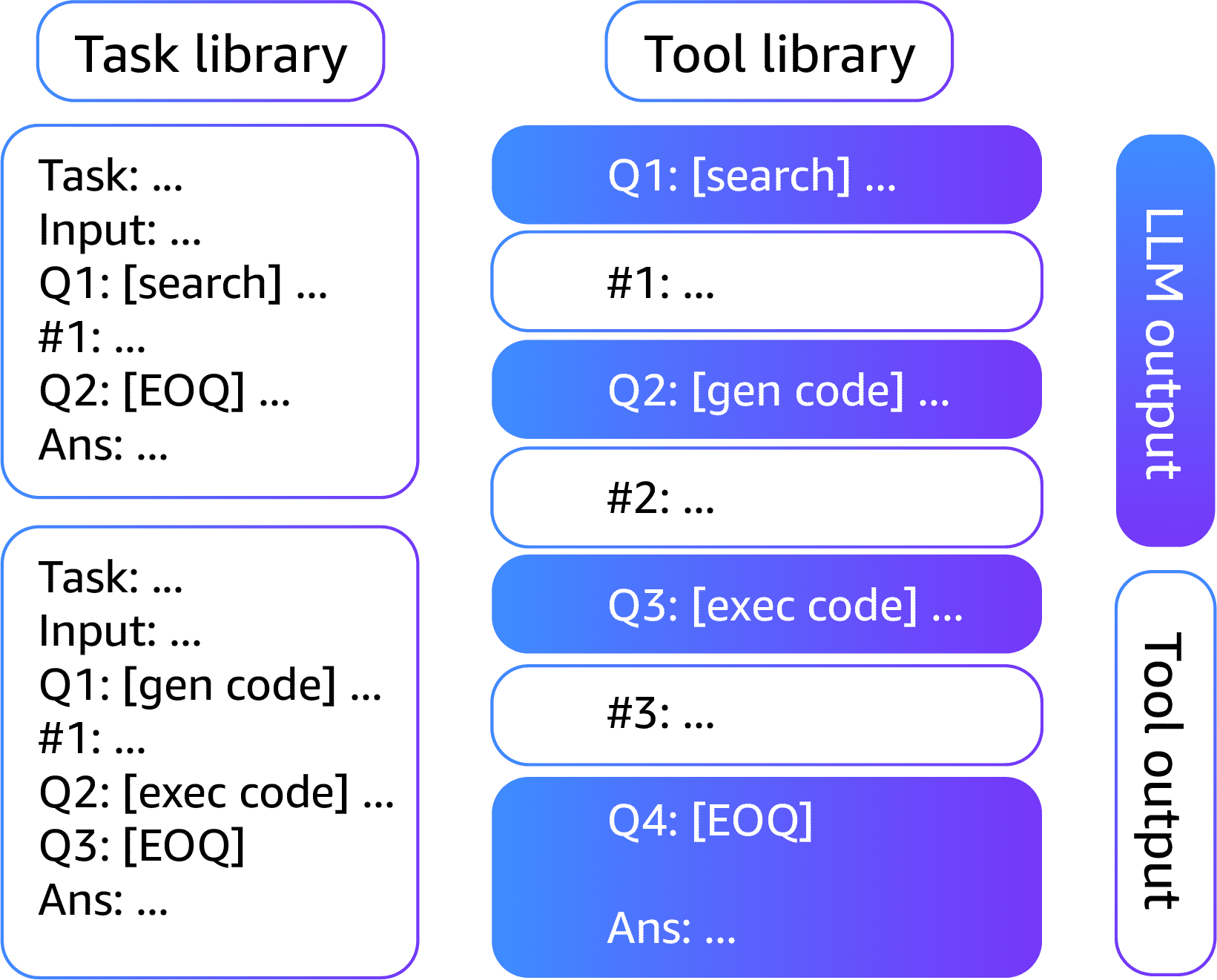

Automatic Reasoning and Tool-use (ART) illustration

This technique deconstructs complex tasks by helping you select demonstrations of multiple, or few-shot, examples from the task library.

While using this few-shot breakdown, you use predefined external tools such as search and code generation to carry out the task.

Research shows that ART performs better than few-shot prompting and automatic CoT for unseen tasks.

It matches the performance of handcrafted CoT prompts on many tasks.

With ART, you can more efficiently update information in the task libraries, which helps correct errors and improve performance.



×

Contact Sales

If you want to use W3Schools services as an educational institution, team or enterprise, send us an e-mail:
sales@w3schools.com

Report Error

If you want to report an error, or if you want to make a suggestion, send us an e-mail:
help@w3schools.com

W3Schools is optimized for learning and training. Examples might be simplified to improve reading and learning. Tutorials, references, and examples are constantly reviewed to avoid errors, but we cannot warrant full correctness of all content. While using W3Schools, you agree to have read and accepted our terms of use, cookies and privacy policy.

Copyright 1999-2026 by Refsnes Data. All Rights Reserved. W3Schools is Powered by W3.CSS.