
Git Study Plan
Introduction
The Git study plan helps you teach your students Git step-by-step.
Creating a study plan for Git is easy.
You can use a pre-built study plan or customize it.
Students have different skill levels. The study plans can be customized to ensure that everyone is challenged.
Save time with pre-built teacher materials and study plans. Easily organize your class with a timeline from the introduction of Git to the final exam.
W3Schools Campus (previously Academy)
This study plan is a feature of W3Schools Campus.
W3Schools Campus is a platform that has everything you need to teach coding, all in one place.
It offers you as a teacher a toolbox of features that helps you succeed with teaching in your classroom.
You need to have an active subscription to access the study plan feature.
- Full Access ($49.99 / year per student)
- Calculate your price and order here.
Campus also offers other features such as:
- Managing your classroom
- Tracking of student progress and reports
- Labs, assignments, and code challenges (prebuilt challenges or create your own ones)
- Auto-grading
- Teaching materials
- Certification exams
Teacher Materials
W3Schools has everything you need to teach Git.
The Git training materials are available for you to include and use in your study plan:
- W3Schools Git Tutorial
- Git Exercises
- Git Quiz
- Git Challenges (Coding challenges)
- Git Certification Exam (End of Pathway Exam)
Git Syllabus
With the Git Syllabus, your students will start with the basics, like understanding version control and creating repositories, and move to more advanced topics, like branching, merging, and collaborating on projects. Each chapter includes simple examples, try-it-yourself sections, exercises, and quizzes to make learning easy, interactive, and fun.
Study Plan Overview
The study plan features are made to help teachers and students. They make learning easy, flexible, and fun. These features work for different types of classes, learning styles and student level.
-
Learning Paths
- You can add ready-made learning paths.
- The learning paths are by default ordered by our recommended order.
- You can change the order.
- You can add custom activities with text, links, or multi-media files.
- Drag and drop or click to make changes to the path.
-
Interactive Content
- Tutorials
- Try-its (test code snippets)
- Exercises
- Quiz
- Challenges
- Labs
-
Timeline and Pace
- You can set a timeline of your study plan (e.g., 4-week, 8-week, 12-week, 24-week plans).
- You can decide the learning pace for your class.
- Different study plans can be assigned to different students in the same class.
- The flexibility can help to make sure that everyone is challenged.
-
Track Student Progress
- There are tools to track student progress.
- The analytic tools include: chapter progress, exercises results, quiz results, exam results, and much more.
- The challenges can be auto-graded or manually graded. The results are available to you as a teacher.
-
End of Pathway Exam
- The Git study plan aligns with the Git Certification Exam.
- The exam can be taken at the end of the study plan, at your selected date.
- The exam summarizes the Git Tutorial.
- You get reports of the students' results.
-
Accessibility
- Study plans and learning materials are accessible on desktops, tablets, and smartphones.
- This ensures students can learn anytime, anywhere.
Sample Study Plan
You choose the timeline and pace of your study plans.
Schools have different preferences.
Some would like a more intensive pace, e.g. 3 weeks, others 12 or more weeks.
It is completely up to you.
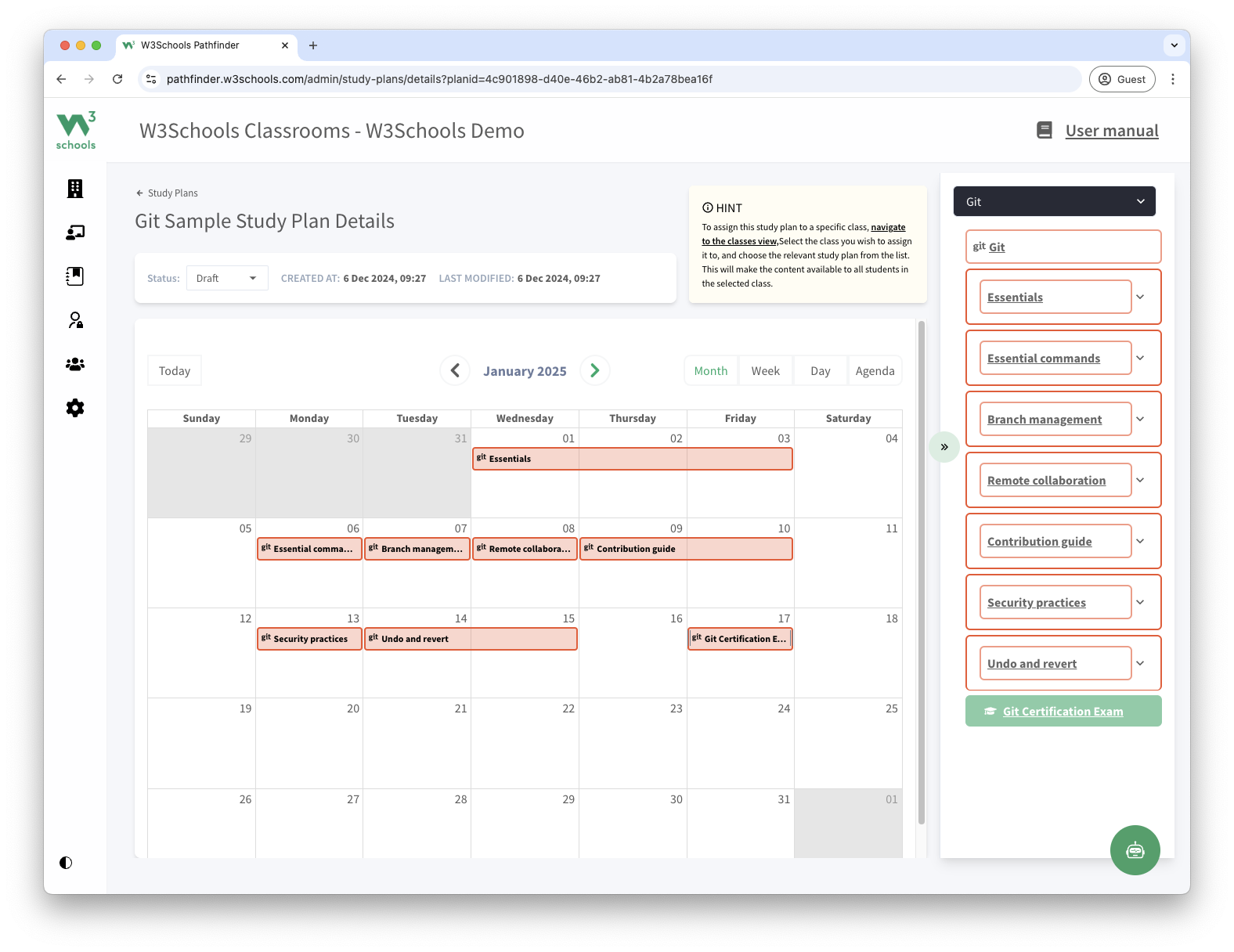
For example, this is what a 3-week Git study plan could look like:
- Week 1: Essentials
- Week 2: Essential Commands, Branch Management, Remote Collaboration, Contribution Guide
- Week 3: Security Practices, Undo and Revert, Git Certification Exam
Image of Sample Git study plan:
Ready to get started?
Start with Git Study Plans today.
Are You a Teacher?
Are you interested in learning how you can use W3Schools Campus to teach Git programming?
Watch a demo of W3Schools Campus. You'll see how it works, and discover how it can make teaching programming easier and more engaging.