
C Get Started
Get Started With C
At W3Schools, you can start learning C without installing anything.
Our Online C Editor runs directly in your browser and shows both the code and the result:
Code:
#include <stdio.h>
int main() {
printf("Hello World!");
return 0;
}
Result:
Hello World!
This editor will be used in the entire tutorial to demonstrate the different aspects of C.
Install C
If you want to run C programs on your own computer, you need two things:
- A text editor to write C code
- A compiler to turn the C code into a program the computer can run
The compiler reads your C code and translates it into machine code.
There are many editors and compilers available. To make things easier, most people use an IDE, which includes both.
Install IDE
An IDE (Integrated Development Environment) is a program that helps you write, compile, and run code.
Popular IDEs include Code::Blocks, Eclipse, and Visual Studio. These are free tools that can also help you find errors in your code.
Note: Web-based IDEs can also work, but they often have limited features.
In this tutorial, we will use Code::Blocks, which is a good and simple choice for beginners.
You can download Code::Blocks from https://www.codeblocks.org.
Choose the mingw-setup.exe file, which includes both the editor and a compiler.
C Quickstart
Let's create our first C file.
Open Codeblocks and go to File > New > Empty File.
Write the following C code and save the file as
myfirstprogram.c (File > Save File as):
myfirstprogram.c
#include <stdio.h>
int main() {
printf("Hello World!");
return 0;
}
Note: C source files always end with .c.
Don't worry if you don't understand the code above - we will discuss it in detail in later chapters. For now, focus on how to run the code.
In Codeblocks, it should look like this:
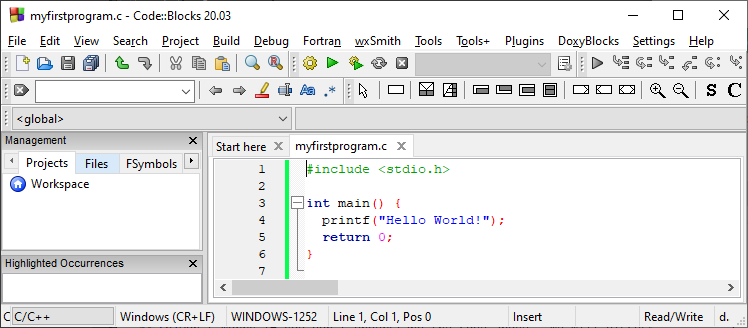
Then, go to Build > Build and Run to run (execute) the program. The result will look something to this:
  Hello World!
Process returned 0 (0x0) execution time : 0.011 s
Press any
  key to continue.
If you see the message above, your setup is working correctly.
Congratulations! You have now written and executed your first C program.
What just happened? You wrote C code, the compiler turned it into a program, and the computer ran it. This is the basic workflow you will use throughout this tutorial.


